
Sales Productivity
Breezway consolidates and automates its business processes with Vtiger, resulting in YoY sales growth.
Find pages, features, and help articles.
Vtiger Layout Designer lets you design, create, and customize module layouts with an easy drag-and-drop action. Organize data effectively by arranging key elements to suit individual user needs and roles. Transform your CRM experience today.

Break away from fixed layouts! Layout Designer empowers you to create custom layouts for each module, adding sections and fields to fit your unique needs. The Summary View in every module is customizable.

Boost user productivity by creating tailored layouts aligned with their roles and responsibilities. Users can see information specific to their needs, improving data alignment and accuracy.

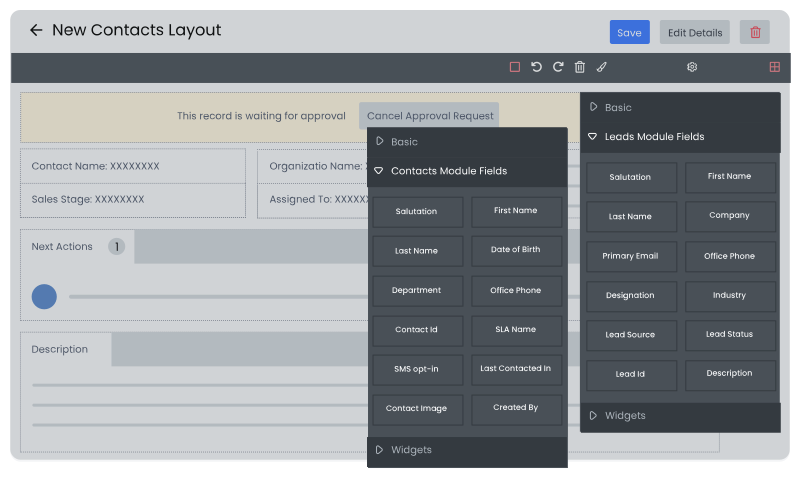
Layout Designer offers intuitive drag-and-drop elements like basic blocks, widgets, and fields. This visual interface empowers you to effortlessly create and customize screens exactly how you want them. This flexibility also lets you adjust CRM layouts as your business grows, ensuring smooth scalability.

Layout Designer provides selective widgets and fields specific to each module. This ensures you see only relevant elements when designing your layouts. For example, a Contact module layout offers fields such as Salutation, Name, Email, and more. For modules with an Address field, a Map widget is available.
Breezway consolidates and automates its business processes with Vtiger, resulting in YoY sales growth.

Pactia uses Vtiger Workflows to automate its sales process to save time and focus on the more important tasks.

GB Advisors customizes its CRM experience using Vtiger to scale up its customer base exponentially.